> ## Documentation Index
> Fetch the complete documentation index at: https://docs.seersearch.com/llms.txt
> Use this file to discover all available pages before exploring further.
# Change Testing (A/B)
> Compare retrieval variants side-by-side
Measure the impact of retrieval changes (e.g., top k, hybrid search, rerankers) before you ship.
Seer runs evaluator-defined metrics (Recall, Precision, F1, nDCG) on unlabeled traffic.
***
## Overview
1. **Log** each retrieval with `feature_flag` in metadata indicating the variant used.
2. **Send traffic** to both variants (split via your own A/B system or run offline comparisons).
3. **View comparisons** in the Seer Change Testing dashboard.
4. **Ship the winner** with confidence.
> **Prerequisites:** You've completed the [Quickstart](/quickstart) and reviewed the [Context & Event Schema](/context-and-event-schema).
***
## Integration Pattern
Add `feature_flag` to your metadata to identify which variant handled each request:
```python theme={null}
from seer import SeerClient
import os
client = SeerClient()
# One retriever; behavior toggled by variant
def retrieve(query: str, variant: str) -> list[dict]:
if variant == "v2":
# e.g., k=20 + hybrid + reranker
return [{"text": "...topk results for v2...", "score": 0.9}]
else:
# e.g., k=10 + bm25
return [{"text": "...topk results for v1...", "score": 0.85}]
def handle_request(query: str, user_id: str):
# Select variant from your flagging system
variant = os.getenv("RETRIEVAL_VARIANT", "v1")
context = retrieve(query, variant)
client.log(
task=query,
context=context,
metadata={
"env": os.getenv("APP_ENV", "prod"),
"feature_flag": variant, # <- key field for change testing
"user_id": user_id,
},
)
# Example
handle_request("best subwoofer size for small room", user_id="u_123")
```
```typescript theme={null}
import { SeerClient } from '@seer/sdk';
const client = new SeerClient();
// One retriever; behavior toggled by variant
function retrieve(query: string, variant: string) {
if (variant === "v2") {
// e.g., k=20 + hybrid + reranker
return [{ text: "...topk results for v2...", score: 0.9 }];
} else {
// e.g., k=10 + bm25
return [{ text: "...topk results for v1...", score: 0.85 }];
}
}
function handleRequest(query: string, userId: string) {
// Select variant from your flagging system
const variant = process.env.RETRIEVAL_VARIANT ?? "v1";
const context = retrieve(query, variant);
client.log({
task: query,
context: context,
metadata: {
env: process.env.APP_ENV ?? "prod",
feature_flag: variant, // <- key field for change testing
user_id: userId,
},
});
}
// Example
handleRequest("best subwoofer size for small room", "u_123");
```
Pass their flag string directly as `feature_flag` so Seer's charts align with your routing.
***
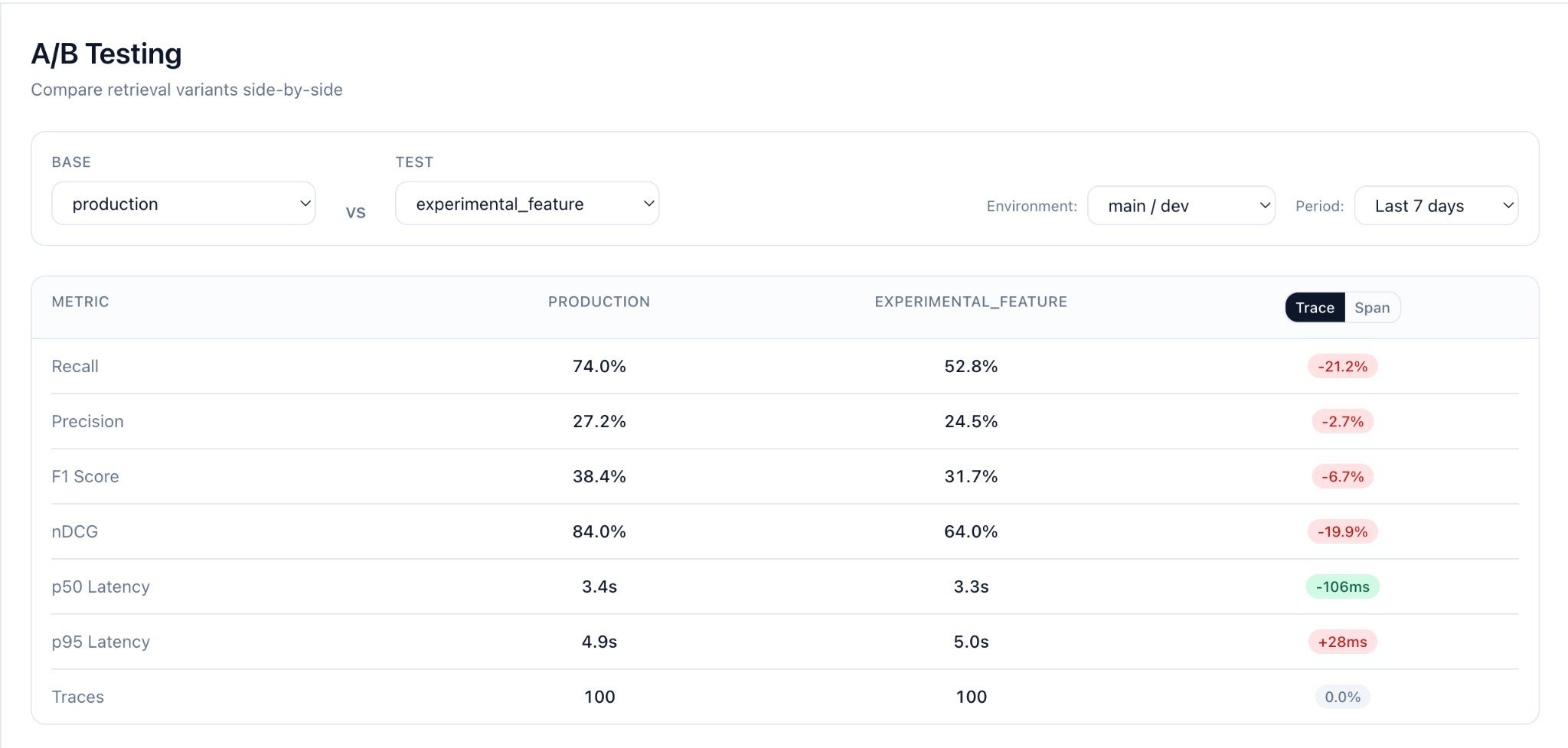
## The Change Testing Dashboard
After logging records with different `feature_flag` values, open the **Change Testing** page in Seer.
### Selecting Variants to Compare
1. Choose **Base** variant from the dropdown (e.g., `production`)
2. Choose **Test** variant to compare against (e.g., `experimental_feature`)
3. Select **Environment** (e.g., `main / dev`)
4. Set **Period** to filter traffic (e.g., `Last 7 days`)
### Metrics Comparison
Seer computes for each variant:
| Metric | Description |
| ------------- | -------------------------------------------------- |
| **Recall** | Fraction of requirements covered by context |
| **Precision** | Fraction of documents that support any requirement |
| **F1** | Harmonic mean of recall and precision |
| **nDCG** | Ranking quality (if scores provided) |
The dashboard shows:
* **Metric cards** with absolute values per variant
* **Delta (candidate - baseline)** with percentage change
* **Trace/Span toggle** to view metrics at different levels
* **Record count** per variant
 ### Interesting Queries
The **Interesting Queries** table shows query pairs where metrics differ between variants:
### Interesting Queries
The **Interesting Queries** table shows query pairs where metrics differ between variants:
 * **Query text** (the `task` field)
* **Base / Test metrics** side-by-side
* **Delta** showing the difference (red = regression, green = improvement)
* **Metric selector** to sort by Recall, Precision, F1, or nDCG
* **Worst regressions** filter to find where your candidate underperforms
Click any row to see full context and evaluation details for both variants.
### Finding Problem Queries
Use the filters to find queries where your candidate underperforms:
* Select **Worst regressions** to find the biggest quality drops
* Sort by **Recall** to prioritize coverage issues
* Use these insights to debug your retrieval pipeline
***
## Example: Testing a Reranker
Run both variants on the same queries and compare:
```python theme={null}
from seer import SeerClient
client = SeerClient()
def retrieve_baseline(query: str) -> list[dict]:
# BM25 only
return bm25_search(query, k=10)
def retrieve_candidate(query: str) -> list[dict]:
# BM25 + reranker
results = bm25_search(query, k=50)
return rerank(query, results)[:10]
# Test queries (from your own dataset or production sample)
test_queries = [
"What causes inflation?",
"How to reset password?",
"Best practices for RAG",
]
for query in test_queries:
# Log baseline
client.log(
task=query,
context=retrieve_baseline(query),
metadata={"feature_flag": "baseline", "env": "offline-test"},
)
# Log candidate
client.log(
task=query,
context=retrieve_candidate(query),
metadata={"feature_flag": "reranker-v1", "env": "offline-test"},
)
```
***
## Production A/B Testing
For live traffic, use your feature flag system to route users:
```python theme={null}
def handle_request(query: str, user_id: str):
# Your A/B system decides the variant
variant = launchdarkly.variation("retrieval-variant", user_id, "v1")
context = retrieve(query, variant)
client.log(
task=query,
context=context,
metadata={
"feature_flag": variant,
"env": "prod",
},
)
```
Then in Seer:
1. Filter to `env=prod`
2. Compare `feature_flag=v1` vs `feature_flag=v2`
3. Monitor metrics over time as traffic accumulates
***
## CI/CD Integration
Run change tests in your CI pipeline:
```yaml theme={null}
# .github/workflows/retrieval-test.yml
name: Retrieval Change Test
on:
pull_request:
paths:
- 'src/retrieval/**'
jobs:
test:
runs-on: ubuntu-latest
env:
SEER_API_KEY: ${{ secrets.SEER_API_KEY }}
steps:
- uses: actions/checkout@v4
- uses: actions/setup-python@v5
with:
python-version: "3.11"
- run: pip install seer-sdk
- run: python scripts/run_change_test.py
```
***
## FAQ
**Do I need separate functions for v1/v2?**
No. Keep one retriever and toggle behavior via params/flags. Log the actual variant in metadata.
**Can I reuse past production traffic?**
Yes. Filter by env/date/flags in the Seer dashboard. All logged traffic is available for comparison.
**What if my context items are objects, not strings?**
Totally fine. Use `{"text": "...", ...}` and Seer reads the `text` field.
**How long do I need to run the test?**
Depends on traffic volume. A few hundred queries per variant typically gives statistical significance.
***
## Next Steps
* [Context & Event Schema](/context-and-event-schema)
* [Metrics](/metrics)
* [Production Monitoring](/production-monitoring)
* **Query text** (the `task` field)
* **Base / Test metrics** side-by-side
* **Delta** showing the difference (red = regression, green = improvement)
* **Metric selector** to sort by Recall, Precision, F1, or nDCG
* **Worst regressions** filter to find where your candidate underperforms
Click any row to see full context and evaluation details for both variants.
### Finding Problem Queries
Use the filters to find queries where your candidate underperforms:
* Select **Worst regressions** to find the biggest quality drops
* Sort by **Recall** to prioritize coverage issues
* Use these insights to debug your retrieval pipeline
***
## Example: Testing a Reranker
Run both variants on the same queries and compare:
```python theme={null}
from seer import SeerClient
client = SeerClient()
def retrieve_baseline(query: str) -> list[dict]:
# BM25 only
return bm25_search(query, k=10)
def retrieve_candidate(query: str) -> list[dict]:
# BM25 + reranker
results = bm25_search(query, k=50)
return rerank(query, results)[:10]
# Test queries (from your own dataset or production sample)
test_queries = [
"What causes inflation?",
"How to reset password?",
"Best practices for RAG",
]
for query in test_queries:
# Log baseline
client.log(
task=query,
context=retrieve_baseline(query),
metadata={"feature_flag": "baseline", "env": "offline-test"},
)
# Log candidate
client.log(
task=query,
context=retrieve_candidate(query),
metadata={"feature_flag": "reranker-v1", "env": "offline-test"},
)
```
***
## Production A/B Testing
For live traffic, use your feature flag system to route users:
```python theme={null}
def handle_request(query: str, user_id: str):
# Your A/B system decides the variant
variant = launchdarkly.variation("retrieval-variant", user_id, "v1")
context = retrieve(query, variant)
client.log(
task=query,
context=context,
metadata={
"feature_flag": variant,
"env": "prod",
},
)
```
Then in Seer:
1. Filter to `env=prod`
2. Compare `feature_flag=v1` vs `feature_flag=v2`
3. Monitor metrics over time as traffic accumulates
***
## CI/CD Integration
Run change tests in your CI pipeline:
```yaml theme={null}
# .github/workflows/retrieval-test.yml
name: Retrieval Change Test
on:
pull_request:
paths:
- 'src/retrieval/**'
jobs:
test:
runs-on: ubuntu-latest
env:
SEER_API_KEY: ${{ secrets.SEER_API_KEY }}
steps:
- uses: actions/checkout@v4
- uses: actions/setup-python@v5
with:
python-version: "3.11"
- run: pip install seer-sdk
- run: python scripts/run_change_test.py
```
***
## FAQ
**Do I need separate functions for v1/v2?**
No. Keep one retriever and toggle behavior via params/flags. Log the actual variant in metadata.
**Can I reuse past production traffic?**
Yes. Filter by env/date/flags in the Seer dashboard. All logged traffic is available for comparison.
**What if my context items are objects, not strings?**
Totally fine. Use `{"text": "...", ...}` and Seer reads the `text` field.
**How long do I need to run the test?**
Depends on traffic volume. A few hundred queries per variant typically gives statistical significance.
***
## Next Steps
* [Context & Event Schema](/context-and-event-schema)
* [Metrics](/metrics)
* [Production Monitoring](/production-monitoring)