

Overview
- Log each retrieval with
feature_flagin metadata indicating the variant used. - Send traffic to both variants (split via your own A/B system or run offline comparisons).
- View comparisons in the Seer Change Testing dashboard.
- Ship the winner with confidence.
Prerequisites: You’ve completed the Quickstart and reviewed the Context & Event Schema.
Integration Pattern
Addfeature_flag to your metadata to identify which variant handled each request:
- Python
- TypeScript
The Change Testing Dashboard
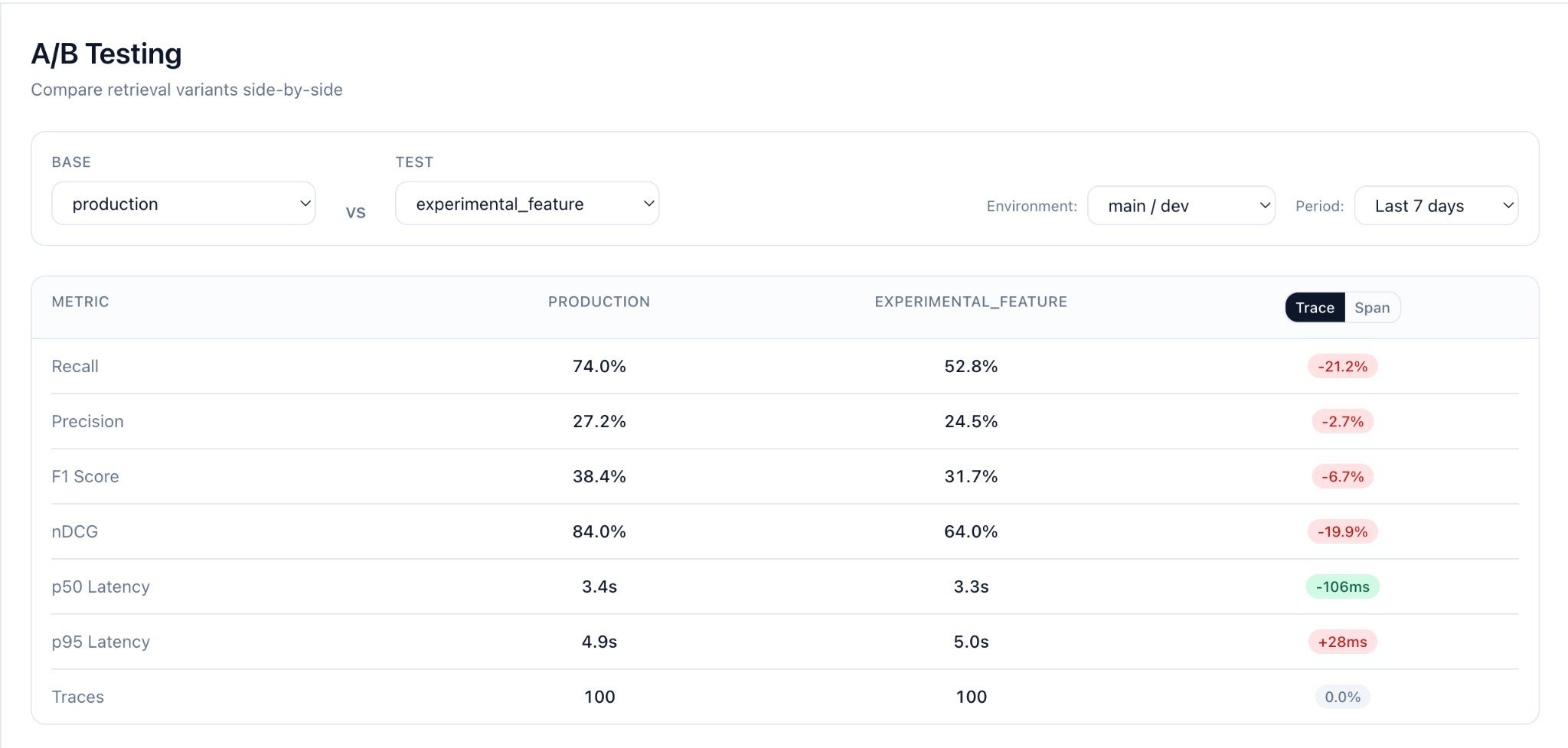
After logging records with differentfeature_flag values, open the Change Testing page in Seer.
Selecting Variants to Compare
- Choose Base variant from the dropdown (e.g.,
production) - Choose Test variant to compare against (e.g.,
experimental_feature) - Select Environment (e.g.,
main / dev) - Set Period to filter traffic (e.g.,
Last 7 days)
Metrics Comparison
Seer computes for each variant:
The dashboard shows:
- Metric cards with absolute values per variant
- Delta (candidate - baseline) with percentage change
- Trace/Span toggle to view metrics at different levels
- Record count per variant
Interesting Queries
The Interesting Queries table shows query pairs where metrics differ between variants:
- Query text (the
taskfield) - Base / Test metrics side-by-side
- Delta showing the difference (red = regression, green = improvement)
- Metric selector to sort by Recall, Precision, F1, or nDCG
- Worst regressions filter to find where your candidate underperforms
Finding Problem Queries
Use the filters to find queries where your candidate underperforms:- Select Worst regressions to find the biggest quality drops
- Sort by Recall to prioritize coverage issues
- Use these insights to debug your retrieval pipeline
Example: Testing a Reranker
Run both variants on the same queries and compare:Production A/B Testing
For live traffic, use your feature flag system to route users:- Filter to
env=prod - Compare
feature_flag=v1vsfeature_flag=v2 - Monitor metrics over time as traffic accumulates
CI/CD Integration
Run change tests in your CI pipeline:FAQ
Do I need separate functions for v1/v2? No. Keep one retriever and toggle behavior via params/flags. Log the actual variant in metadata. Can I reuse past production traffic? Yes. Filter by env/date/flags in the Seer dashboard. All logged traffic is available for comparison. What if my context items are objects, not strings? Totally fine. Use{"text": "...", ...} and Seer reads the text field.
How long do I need to run the test?
Depends on traffic volume. A few hundred queries per variant typically gives statistical significance.